Asus Zenbook DUO: The Future of Multi-Screen Laptops Is Here
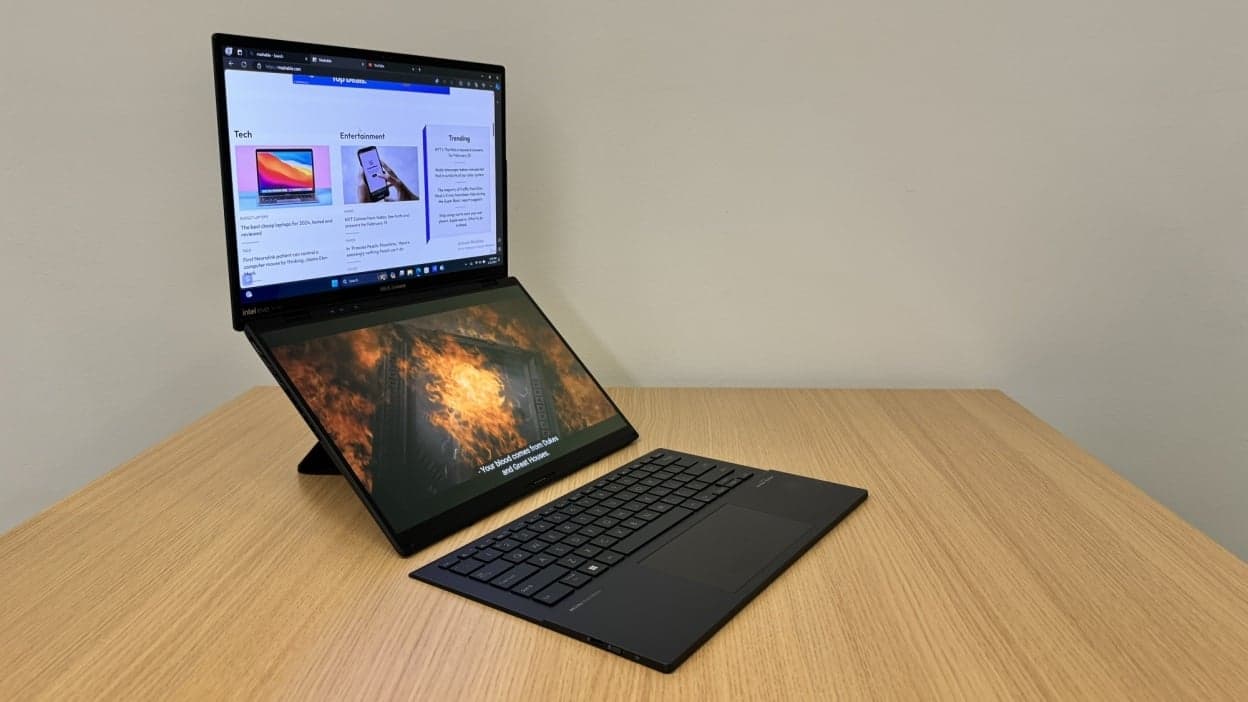
The laptop world is changing fast, and one of the most interesting innovations in recent years is the Asus ZenBook DUO. It’s not just another premium ultrabook—it’s a completely new way of working, creating, and multitasking. If you’ve ever felt limited by a single screen while juggling multiple apps, tabs, or creative tools, the Asus ZenBook DUO is designed exactly for that problem.
In this article, we’ll break down what makes the Asus ZenBook DUO special, who it’s for, and why it’s getting so much attention in the tech world.
What is the Asus ZenBook DUO?
At its core, the Asus ZenBook DUO is a dual-screen laptop. Instead of one traditional display, it comes with two full-size OLED touchscreens—one on the top and another where the keyboard usually sits. You can use it in multiple modes, making it one of the most flexible laptops available today.
Unlike standard laptops that rely on external monitors for extra space, the Asus ZenBook DUO builds that productivity boost directly into the device.
Dual Screen Design That Actually Makes Sense
The highlight of the Asus ZenBook DUO is its dual-display setup:
- A main OLED display for your primary work
- A secondary full-width touchscreen for multitasking, tools, or timelines
You can drag apps between screens just like you would on a multi-monitor desktop setup. For example:
- Edit a video on the top screen while keeping your timeline on the bottom
- Code on one screen while viewing documentation on the other
- Write a document while keeping research tabs open below
It feels surprisingly natural after a short learning curve, and that’s where Asus has done a great job with software optimization.
Keyboard Flexibility and Different Modes
One of the most interesting things about the Asus ZenBook DUO is how the keyboard works. It’s detachable and wireless, meaning you can place it anywhere you want.
You also get multiple usage modes:
- Laptop Mode – Classic setup with keyboard and dual screen multitasking
- Desktop Mode – Use both screens stacked vertically for maximum productivity
- Tablet Mode – Detach the keyboard and use touch input
- Sharing Mode – Flip the display for presentations or collaboration
This flexibility makes the Asus ZenBook DUO feel less like a traditional laptop and more like a portable workstation.
Performance That Matches the Design
A futuristic design means nothing without strong performance, and the Asus ZenBook DUO doesn’t disappoint. It is built for professionals who need power on the go.
Typical configurations include:
- High-performance Intel Core processors
- Fast SSD storage for quick load times
- Large RAM options for heavy multitasking
- Integrated or dedicated graphics depending on model
This makes it suitable for:
- Video editing
- Graphic design
- Programming and development
- Business multitasking
- Content creation
Even with dual OLED screens running simultaneously, performance remains smooth and responsive.
Display Quality: A Visual Treat
Both screens on the Asus ZenBook DUO are OLED panels, which means:
- Deep blacks
- High contrast ratio
- Vibrant and accurate colors
- Excellent viewing angles
For creators, this is a huge advantage. Whether you’re editing photos or watching content, the visual experience is sharp and immersive.
Who Should Buy the Asus ZenBook DUO?
The Asus ZenBook DUO is not your average everyday laptop—it’s designed for a specific type of user.
It’s ideal for:
- Content creators who need multi-app workflows
- Developers who use code + documentation simultaneously
- Designers and editors working with timelines and layers
- Professionals who multitask heavily
- Tech enthusiasts who love innovation
However, if you only use a laptop for basic browsing, emails, and streaming, this might be more than you need.
Battery Life and Portability
With two screens running, battery efficiency is always a concern. The Asus ZenBook DUO balances this with optimized power management, but real-world usage depends heavily on brightness and workload.
In terms of portability, it remains fairly slim for a dual-screen device, though slightly heavier than standard Ultrabook due to its advanced hardware.
Final Thoughts on Asus ZenBook DUO
The Asus ZenBook DUO is one of those rare laptops that genuinely tries to rethink how we work instead of just upgrading specs. Its dual-screen setup is not a gimmick—it’s a productivity-focused innovation that can significantly improve workflow for the right user.
If you’re someone who constantly struggles with screen space or multitasking limits, the Asus ZenBook DUO offers a refreshing solution. It may take a little time to adjust, but once you do, going back to a single screen feels restrictive.
In short, the Asus ZenBook DUO is not just a laptop—it’s a glimpse into the future of personal computing.